Software Development Life Cycle (SDLC)
Understanding SDLC, its goals, and ISO standards
What is SDLC?
Software Development Life Cycle (SDLC) is a structured process used by software industry to design, develop, and test high-quality software.
Goals of SDLC
- Deliver high-quality software that meets or exceeds customer expectations
- Complete projects within planned timelines and budgets
- Minimize risks and ensure smooth project execution
- Maintain effective communication and collaboration among team members
SDLC Phases
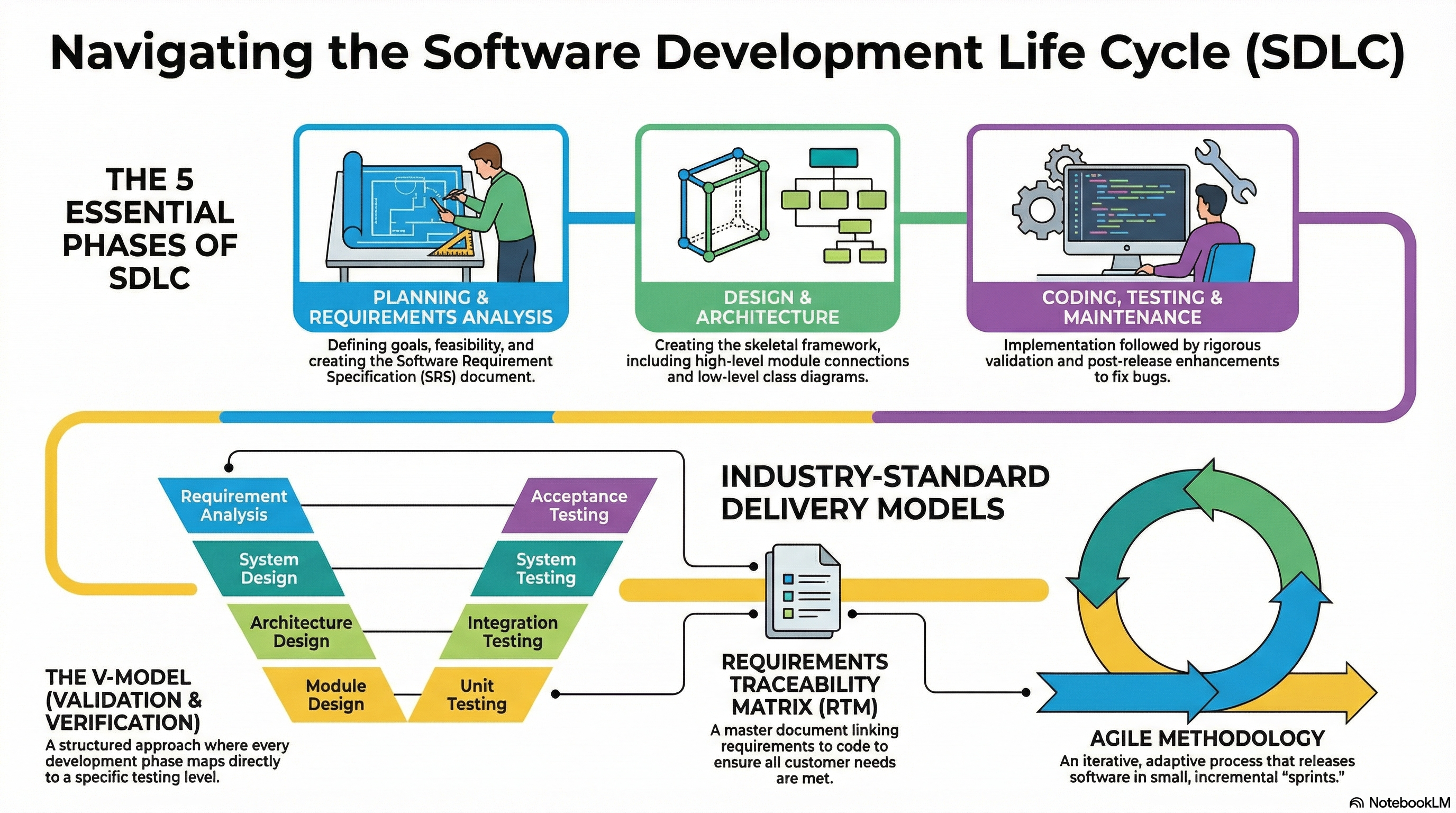
1. Planning and Requirements Definition
The Planning and Requirements Definition phase is the first stage of the SDLC. It serves as the foundational period where the team determines what software to build and how to organize the resources required to create it.
Core Planning Activities
At the start, the team must address fundamental logistical and strategic questions to define the scope of the project:
- Development Goals: Determining what the software is meant to do and what requirements it must satisfy.
- Resource Allocation: Identifying how many people are needed, how to delegate tasks, and the billing rates involved.
- Timeline: Establishing how much time is available to finish and release the software, as well as scheduling any intermediate releases.
- Feasibility Study: Conducting a study to ensure the requirements are actually possible to design and develop within the given constraints.
Requirements Definition
This process involves identifying both customer needs and market needs to distinguish the product from existing offerings. Requirements are categorized into several types, often resulting in at least half a dozen different documents:
- Functional and Software Requirements: Often captured in a Software Requirement Specification (SRS) document.
- System and Hardware Requirements: Defining the high-level system needs and necessary hardware.
- Non-Functional Requirements: These include quality, performance, latency, reliability, maintainability, and user interface (UI) specifications.
- Stakeholder Approval: All collected requirements must be approved by the appropriate stakeholders before moving forward.
Requirements Kinds and Requirements Analysis
Once requirements are collected, they undergo a rigorous analysis process that can take weeks or even months. The goal is to ensure the requirements possess the following properties:
| Property | Description |
|---|---|
| Feasibility | Checking if the request is technically possible |
| Consistency | Ensuring that requirements do not contradict one another or that one requirement does not make another impossible to achieve |
| Completeness | Identifying if any important specifications have been left out |
| Flow | Checking for a natural cascading dependency between various requirements |
Feasibility Study
A feasibility study is conducted to evaluate whether the proposed software project is viable from multiple perspectives:
- Technical Feasibility: Can the technology support the requirements?
- Economic Feasibility: Is the project financially viable? (Cost-benefit analysis)
- Operational Feasibility: Will the system work in the intended operational environment?
- Legal Feasibility: Does the project comply with laws and regulations?
Work Products (Deliverables)
The primary outputs of this phase are the artifacts that guide the rest of the SDLC:
- Requirements Documents: Comprehensive files for software, hardware, and functional/non-functional specs.
- Project Plan: A document identifying the total duration of the effort and the staffing plan.
- Requirements Traceability Matrix (RTM): An essential document (often an Excel sheet) used to link requirements to future artifacts like design, code, and test cases to ensure all needs are met.
- Test Case Foundation: In models like the V-Model, the requirements defined at this stage are directly used later to create acceptance tests.
Software Requirement Specification (SRS)
The Software Requirement Specification (SRS) is a comprehensive document that describes what the software will do and how it will be expected to perform. It serves as the foundation for the entire development process.
Key Components of an SRS:
- Introduction: Purpose, scope, definitions, and references
- Overall Description: Product perspective, user classes, operating environment
- System Features: Detailed functional requirements
- External Interface Requirements: User, hardware, software, and communication interfaces
- Non-Functional Requirements: Performance, security, reliability, availability
- Other Requirements: Database, internationalization, legal compliance
Characteristics of a Good SRS:
- Correct: Accurately describes the system requirements
- Unambiguous: Every requirement has only one interpretation
- Complete: Includes all significant requirements
- Consistent: No conflicts between requirements
- Verifiable: Each requirement can be tested
- Modifiable: Easy to change while maintaining consistency
- Traceable: Origin of each requirement is clear
Example: Amazon E-Commerce Platform
To illustrate the Planning and Requirements Definition phase, consider developing an e-commerce platform like Amazon:
System-Level Requirements:
- Multi-platform availability (iOS, Android, Web browsers, Mobile Web)
- Cloud-based infrastructure (AWS) with auto-scaling capabilities
- Global deployment across multiple regions
- Integration with payment gateways, logistics partners, and third-party sellers
Functional Requirements:
- User authentication and account management
- Product search with filters (category, price, ratings, brand)
- Shopping cart and wishlist functionality
- Secure checkout process with multiple payment options
- Order tracking and history
- Customer reviews and ratings system
- Seller dashboard for inventory management
- Recommendation engine based on browsing history
Non-Functional Requirements:
- Performance: Page load time under 2 seconds, handle 10M+ concurrent users during peak sales
- Security: End-to-end encryption, PCI-DSS compliance, fraud detection
- Reliability: 99.99% uptime, automatic failover mechanisms
- Scalability: Handle 1000% traffic spikes during events like Prime Day
- Usability: Accessible design (WCAG 2.1 compliance), multi-language support
Work Products for Amazon:
- Comprehensive SRS document (500+ pages)
- Project timeline with phased rollout (MVP → Full Platform)
- RTM linking each feature to business objectives and test cases
- Risk assessment and mitigation strategies
- Budget allocation for infrastructure, development, and marketing
2. Design and Architecture
Following the Planning and Requirements phase, the Design and Architecture phase represents the second stage of the Software Development Life Cycle (SDLC). This phase is responsible for creating the skeletal framework of how the software will be developed.
Design and architecture are "hand in glove" and are often performed together, though they focus on different aspects of the software.
Software Design
Software design focuses on the internal structure of the product.
High-Level Design (HLD):
- Identifies all the modules of the software and their relationships
- Utilizes Object-Oriented Design (OOD) concepts
- Defines classes, inheritance hierarchies, constructors, and polymorphic methods
- Establishes module boundaries and interfaces between components
- Creates architectural patterns (MVC, Microservices, Layered Architecture)
Low-Level Design (LLD):
- Provides a detailed skeleton that "almost talks about the code"
- Developers use this during implementation to ensure smooth code generation
- Includes detailed algorithms, data structures, and pseudo-code
- Defines database schemas, API specifications, and class diagrams
Modeling:
- Designers use UML (Unified Modeling Language) models to visualize system internals
- Common UML diagrams include:
- Class Diagrams: Show classes, attributes, methods, and relationships
- Sequence Diagrams: Illustrate interactions between objects over time
- Use Case Diagrams: Depict user interactions with the system
- Activity Diagrams: Show workflow and business processes
Software Architecture
While design looks inward at modules, architecture focuses on how those modules are connected and how the software interacts with its environment.
Platform Compatibility:
- Determines which operating systems the software will support (Android, iOS, Windows, Linux)
- Selects databases (SQL, NoSQL, Graph databases)
- Identifies supported web browsers (Chrome, Edge, Firefox, Safari)
- Chooses cloud platforms and deployment environments
User Interface (UI):
- High-level UI aspects including layout, navigation patterns, and design systems
- Responsive design considerations for different screen sizes
- Accessibility standards and usability guidelines
Feasibility Validation:
- The architecture must be validated for feasibility
- Cannot depend on technologies or operating systems not yet in production
- Must align with existing infrastructure and organizational capabilities
Key Work Products (Deliverables)
The outputs of this phase serve as the blueprint for the rest of the project:
- Design and Architecture Documents: Static files (PDFs) or documents created in dedicated editors (Confluence, Notion, Wiki)
- Models: Specialized models using modeling languages such as UML, SysML, or AADL
- API Specifications: Detailed documentation for internal and external APIs
- Database Schemas: Entity-Relationship diagrams and schema definitions
Relationship to the Testing Phase (V-Model)
In models like the V-Model, there is a direct mapping between design activities and testing activities:
| Design Activity | Testing Activity |
|---|---|
| Architecture | Provides foundation for integration tests - checking how different modules work together |
| Design Documents | Used to create system tests - ensuring the software functions as intended as a whole |
| Low-Level Design | Provides framework for generating unit tests and module-level integration tests |
This traceability ensures that every design decision has corresponding test coverage.
Example: Amazon E-Commerce Platform - Design Phase
Continuing with the Amazon example, here's how the Design and Architecture phase would unfold:
High-Level Design:
| Module | Responsibility | Key Components |
|---|---|---|
| User Service | Authentication, profiles, preferences | User class, AuthManager, ProfileController |
| Product Catalog | Product listings, categories, search | Product class, CatalogService, SearchEngine |
| Shopping Cart | Cart management, persistence | Cart class, CartItem, CartRepository |
| Order Service | Order processing, fulfillment | Order class, OrderProcessor, PaymentGateway |
| Recommendation Engine | Personalized suggestions | ML models, RecommendationService |
| Notification Service | Emails, SMS, push notifications | NotificationManager, Queue handlers |
Low-Level Design Example (Shopping Cart Module):
Class: Cart
- Attributes: cartId, userId, items[], totalAmount, createdAt, updatedAt
- Methods:
  - addItem(productId, quantity): boolean
  - removeItem(itemId): boolean
  - updateQuantity(itemId, quantity): boolean
  - calculateTotal(): decimal
  - clearCart(): void
  - validateCart(): ValidationResult

Class: CartItem
- Attributes: itemId, productId, quantity, unitPrice, subtotal
- Methods:
  - calculateSubtotal(): decimal
  - validateAvailability(): boolean
Software Architecture:
- Platform: Multi-platform (iOS, Android, Web, Mobile Web)
- Architecture Pattern: Microservices architecture with API Gateway
- Database:
- PostgreSQL for transactional data (orders, users)
- MongoDB for product catalogs (flexible schema)
- Redis for caching and session management
- Elasticsearch for search functionality
- Cloud Infrastructure: AWS (EC2, S3, RDS, Lambda, CloudFront)
- Communication: REST APIs, GraphQL, Message queues (SQS, Kafka)
- UI Framework: React (Web), React Native (Mobile), Swift (iOS native)
UML Diagrams Created:
- Class diagrams for all major services
- Sequence diagrams for checkout flow, order placement
- Use case diagrams for customer and seller interactions
- Deployment diagrams showing AWS infrastructure
Work Products:
- High-Level Design Document (HLD) - 100+ pages
- Low-Level Design Document (LLD) for each module
- API specification documents (OpenAPI/Swagger)
- Database schema diagrams
- Architecture Decision Records (ADRs)
- UI/UX mockups and wireframes
3. Coding / Development (Implementation)
The Coding or Development phase, also referred to as the implementation phase, is where the actual software is built based on the blueprints created in earlier stages.
Implementation and Code Generation
Design-Led Development:
- Developers use the low-level design documents and models from the previous phase to write the code
- When design and modeling are performed thoroughly, the process of generating code is generally smooth
- Code is organized into modules, classes, and functions as specified in the LLD
Adherence to Standards:
- Organizations typically have specific coding guidelines that every developer must follow
- These standards ensure consistency, readability, and maintainability across the project
- Common standards include naming conventions, code formatting, and documentation practices
Integrated Developer Testing
While a dedicated testing phase follows this one, significant testing occurs during development:
Unit Testing:
- Developers are responsible for testing the software at the most granular level
- Tests individual methods, procedures, or functions in isolation
- Ensures each component works correctly before integration
- Uses frameworks like JUnit, pytest, Jest, or NUnit
Debugging:
- Especially in agile methodologies, developers perform their own debugging alongside coding
- Tools like debuggers, logging, and profilers help identify and fix issues
- Code reviews and pair programming also catch defects early
Simultaneous Activity:
- In this phase, coding and unit testing are often done side-by-side
- Test-Driven Development (TDD) writes tests before code
- Continuous Integration (CI) runs tests automatically on code commits
Management and Tracking
The coding phase is a highly monitored period:
- Team Leads and Project Managers actively track progress
- Sprint Planning in Agile allocates tasks and estimates effort
- Daily Stand-ups identify blockers and track completion
- Burndown Charts visualize progress against the schedule
- Code Repositories (Git) track changes and enable collaboration
Key Work Products (Deliverables)
The outputs of this phase are critical artifacts for the remainder of the SDLC:
- Executable Code: The primary output is the actual functioning software
- Source Code: All program files organized in the repository
- Technical Documentation: Code comments, README files, and API docs explaining the code structure and logic
- Unit Test Cases: The specific tests created and used by developers to validate their code
- Build Scripts: Configuration for compiling and packaging the application
Position in SDLC Models
V-Model:
- Coding and unit testing represent the bottom-most point of the "V"
- Serves as the transition point from design/specification to verification and validation
- Unit tests map directly to low-level design components
Agile Model:
- Coding is part of a rapid iteration or "sprint"
- Instead of waiting for total system design, developers write code for small subsets of features
- Test them and release them incrementally
- Continuous feedback drives rapid improvements
Example: Amazon E-Commerce Platform - Coding Phase
Continuing with the Amazon example, here's how the Coding phase would be executed:
Implementation by Module:
| Module | Technology Stack | Key Implementation Tasks |
|---|---|---|
| User Service | Java/Spring Boot, PostgreSQL | Auth controllers, JWT tokens, password hashing, session management |
| Product Catalog | Node.js, MongoDB, Elasticsearch | Product APIs, search indexing, category trees, inventory sync |
| Shopping Cart | Java/Spring Boot, Redis | Cart REST APIs, cache management, session persistence |
| Order Service | Java/Spring Boot, PostgreSQL | Order processing, payment integration, transaction management |
| Recommendation Engine | Python, TensorFlow, Spark | ML model training, real-time inference, A/B testing framework |
| Notification Service | Node.js, AWS Lambda, SQS | Email templates, SMS gateway, push notification handlers |
Coding Standards Followed:
- Java: Google Java Style Guide, Checkstyle for linting
- JavaScript/TypeScript: ESLint, Prettier for formatting
- Python: PEP 8, Black formatter, type hints
- Git: Conventional commits, branch naming conventions (feature/, bugfix/, hotfix/)
- Documentation: JavaDoc, JSDoc, docstrings for all public APIs
Unit Testing Examples (Shopping Cart Module):
@Test
public void testAddItemToCart() {
    Cart cart = new Cart("user123");
    Product product = new Product("prod456", "Laptop", 999.99);

    boolean result = cart.addItem(product.getId(), 2);

    assertTrue(result);
    assertEquals(2, cart.getItems().size());
    assertEquals(1999.98, cart.getTotalAmount(), 0.01);
}

@Test
public void testRemoveItemFromCart() {
    Cart cart = new Cart("user123");
    cart.addItem("prod456", 1);

    boolean result = cart.removeItem("prod456");

    assertTrue(result);
    assertEquals(0, cart.getItems().size());
}

@Test
public void testCalculateTotalWithDiscount() {
    Cart cart = new Cart("user123");
    cart.addItem("prod1", 2, 100.0);  // $200
    cart.addItem("prod2", 1, 50.0);   // $50
    cart.applyDiscount("SAVE10");      // 10% off

    assertEquals(225.0, cart.getTotalAmount(), 0.01);
}
Development Workflow:
- Sprint Planning: 2-week sprints with clearly defined user stories
- Daily Stand-ups: 15-minute sync on progress and blockers
- Code Reviews: All code reviewed via Pull Requests before merging
- CI/CD Pipeline:
- Automated build on every commit
- Unit tests run automatically
- Code coverage reports (target: 80%+)
- Static analysis (SonarQube) for code quality
- Feature Flags: New features deployed but hidden until ready
Work Products:
- Source code repository (GitHub/GitLab) with 100K+ lines of code
- Unit test suite with 10,000+ test cases
- Technical documentation (API docs, architecture diagrams)
- Build and deployment scripts (Docker, Kubernetes configs)
- Code coverage reports (typically 80-90% coverage)
- CI/CD pipeline configuration (Jenkins, GitHub Actions)
4. Testing Phase
The Testing phase is a dedicated stage in the SDLC that follows the coding phase. While some testing occurs during development (unit testing), this specific phase focuses exclusively on validating the product without writing new code.
Core Testing Activities
Thorough Validation:
- The product is rigorously tested to ensure all functionality satisfies the initial requirements
- Testers verify that each requirement from the SRS has been implemented correctly
- Both positive and negative test scenarios are executed
Defect Management:
- Testing involves a cycle where defects are reported, fixed, and then retested
- Bug tracking tools (Jira, Bugzilla, Azure DevOps) manage the defect lifecycle
- Severity and priority levels categorize defects (Critical, High, Medium, Low)
- The goal is to ensure the software is error-free before release
Integration Testing:
- Putting two or more developed modules together to ensure they work as a unit
- System Integration Testing: The software is tested directly on the server alongside hardware and databases
- Identifies interface issues, data flow problems, and communication failures between modules
Certification and Accreditation:
- If a software product requires third-party certification, the necessary documentation and specialized testing are performed
- Common certifications include ISO 27001 (security), SOC 2 (compliance), PCI-DSS (payments)
- Security testing and penetration testing may be required
Testing in Different Models
V-Model: This model focuses extensively on verification and validation, creating a direct mapping between development stages and testing stages:
| Development Stage | Testing Stage | Test Case Origin |
|---|---|---|
| Requirements | Acceptance Testing | Validates software against business requirements |
| Design | System Testing | Tests the complete integrated system |
| Architecture | Integration Testing | Tests module interactions |
| Module Design | Unit Testing | Tests individual components |
Agile Model:
- Testing is not a final standalone phase but is done in small subsets or "increments"
- Each feature is planned, designed, coded, and tested within a rapid iteration or "sprint"
- Continuous Testing is integrated into the CI/CD pipeline
- Testers work alongside developers throughout the sprint
Regression Testing (Maintenance Phase Connection)
Testing continues even after the software is released to the customer:
- Definition: Regression testing ensures that new changes or bug fixes do not break existing functionality
- During the maintenance phase, errors found post-deployment are fixed, and new features may be added
- Reusability: Developers reuse part of the test cases created during initial development and create new ones for added features
- Automated regression test suites run on every build to catch unintended side effects
Key Work Products (Deliverables)
- Test Cases and Documentation: Detailed documents outlining the scenarios used to validate the software, including:
- Test case ID, description, preconditions, steps, expected results, actual results
- Test data requirements and environment setup
- Requirements Traceability Matrix (RTM): An Excel sheet linking each requirement to its corresponding design, code, and test case, proving the software meets every specific customer requirement
- Test Execution Reports: Summary of test runs, pass/fail statistics, defect density
- Quality Audit Reports: Documentation from quality inspection teams certifying the software is safe and ready for the market
- Test Summary Report: Final report indicating readiness for release
Example: Amazon E-Commerce Platform - Testing Phase
Continuing with the Amazon example, here's how the Testing phase would be executed:
Testing Levels and Approach:
| Testing Level | Focus Area | Example Test Cases |
|---|---|---|
| Unit Testing | Individual methods/functions | addItem(), calculateTotal(), validateCart() |
| Integration Testing | Module interactions | Cart ↔ Product Catalog, Order ↔ Payment Gateway |
| System Testing | End-to-end workflows | Complete purchase flow from search to checkout |
| Acceptance Testing | Business requirements | User can buy a product using multiple payment methods |
Sample Test Cases for Shopping Cart:
| Test ID | Description | Steps | Expected Result | Status |
|---|---|---|---|---|
| TC001 | Add single item to cart | 1. Login 2. Search product 3. Click "Add to Cart" | Item appears in cart with correct quantity | Pass/Fail |
| TC002 | Add multiple items | 1. Add item A 2. Add item B 3. View cart | Both items displayed with correct prices | Pass/Fail |
| TC003 | Remove item from cart | 1. Add item 2. Click remove 3. Confirm | Item removed, total updated | Pass/Fail |
| TC004 | Apply valid coupon | 1. Add items worth $100 2. Apply "SAVE10" | Discount applied, new total $90 | Pass/Fail |
| TC005 | Apply invalid coupon | 1. Add items 2. Apply "INVALID" | Error message displayed, no discount | Pass/Fail |
| TC006 | Cart persistence after logout | 1. Add items 2. Logout 3. Login again | Cart items retained | Pass/Fail |
Defect Management Example:
Bug ID: BUG-2047
Title: Cart total not updating after removing item
Severity: High
Priority: Critical
Steps to Reproduce:
  1. Add 2 items to cart (Item A: $50, Item B: $30)
  2. Remove Item A
  3. Observe cart total
Expected: Total should be $30
Actual: Total still shows $80
Status: Fixed → Retested → Closed
Integration Testing Scenarios:
- Cart + Product Catalog: Verify product details (price, availability) are correctly fetched when adding to cart
- Cart + User Service: Ensure cart is associated with correct user ID
- Order + Payment Gateway: Test payment processing with various methods (Credit Card, PayPal, Amazon Pay)
- Order + Notification Service: Verify order confirmation email is sent after successful purchase
System Testing Workflows:
- End-to-End Purchase Flow:
- Search → View Product → Add to Cart → Checkout → Payment → Order Confirmation
- Return/Refund Flow:
- View Order → Initiate Return → Print Label → Track Return → Receive Refund
- Seller Workflow:
- Seller Login → Add Product → Manage Inventory → View Orders → Process Shipment
Performance Testing:
- Load Testing: Simulate 10,000 concurrent users adding items to cart
- Stress Testing: Push system beyond capacity to identify breaking points
- Spike Testing: Sudden traffic increase (e.g., flash sale starting)
- Endurance Testing: Sustained load over 24+ hours to detect memory leaks
Security Testing:
- SQL Injection attempts on search and login fields
- Cross-Site Scripting (XSS) prevention in product reviews
- Payment data encryption verification
- Session hijacking prevention
- CSRF token validation
Work Products for Amazon Testing:
- Test Plan Document (50+ pages covering scope, approach, resources)
- 5,000+ detailed test cases covering all modules
- Requirements Traceability Matrix linking 500+ requirements to test cases
- Automated test suite (Selenium, JUnit, TestNG) with 80% automation coverage
- Performance test reports (JMeter/LoadRunner results)
- Security audit report from third-party penetration testing
- Defect reports with metrics (defect density, defect removal efficiency)
- Test Summary Report certifying release readiness
5. Maintenance Phase
The Maintenance phase is the final stage of the Software Development Life Cycle (SDLC) that begins once the software has been thoroughly tested and deployed to the customer. Unlike earlier phases, maintenance is an ongoing process that often lasts for the entire lifetime of the software, potentially spanning several years.
Addressing Post-Release Issues
Even after rigorous testing, new errors may be discovered after the product is in the hands of the customer:
- Bug Fixes: Production issues reported by users through support tickets or monitoring alerts
- Hotfixes: Critical patches deployed immediately to resolve severe issues
- Patch Releases: Scheduled updates addressing multiple known issues
- Root Cause Analysis: Investigating underlying causes to prevent recurrence
The maintenance phase involves fixing these errors and retesting the software to ensure stability before releasing patches.
Feature Enhancements and Change Requests
Maintenance is not just about fixing bugs; it also addresses evolving customer needs:
New Feature Enhancements:
- Adding capabilities not part of the original release
- Competitive features to match market leaders
- Technology upgrades (e.g., migrating to newer frameworks)
- Performance optimizations based on production metrics
Change Requests:
- Modifying existing functionality based on customer feedback
- Adapting to market changes or regulatory updates
- UI/UX improvements based on user behavior analytics
- Integration with new third-party services
Regression Testing in Maintenance
A critical technical activity during maintenance is regression testing. Any change to the code carries the risk of breaking existing functionality:
Test Case Reuse:
- Developers partly reuse test cases created during initial development phases
- Automated regression suites run on every code change
- Core functionality tests are always executed (smoke tests)
New Test Cases:
- New test cases are created specifically to validate added features
- Bug fix verification tests ensure issues don't recur
- Edge case tests for newly discovered scenarios
Regression Testing Strategy:
- Full Regression: Complete test suite run before major releases
- Partial Regression: Selected tests for minor patches and hotfixes
- Automated Regression: CI/CD pipeline runs tests automatically
Connection to Other Phases
Planning Phase Connection:
- The groundwork for maintenance is laid during the first phase of the SDLC
- Requirements for maintainability are defined and approved by stakeholders
- Non-functional requirements specify expected system lifespan and update frequency
SDLC Models Perspective:
| Model | Maintenance Approach |
|---|---|
| Waterfall/V-Model | Maintenance is the final step following deployment; distinct phase after release |
| Agile | Maintenance-like activities happen continuously across multiple iterations/sprints |
| DevOps | Continuous deployment with automated monitoring and rapid feedback loops |
Types of Maintenance
| Type | Description | Example |
|---|---|---|
| Corrective | Fixing defects and bugs | Fixing checkout error when using specific credit card |
| Adaptive | Modifying for changing environment | Updating app for new iOS version compatibility |
| Perfective | Enhancing functionality | Adding "Buy Now" button for faster checkout |
| Preventive | Preventing future problems | Refactoring code to reduce technical debt |
Example: Amazon E-Commerce Platform - Maintenance Phase
Continuing with the Amazon example, here's how the Maintenance phase operates:
Post-Release Issue Resolution:
Issue Report #AMZ-4521 (Customer Support)
Title: Cart shows wrong total when combining items from different sellers
Severity: High
Customer Impact: 500+ reports in 24 hours

Root Cause: Shipping calculation logic not handling multi-seller orders correctly

Fix Applied:
- Updated ShippingCalculator.java to aggregate costs per seller
- Added validation for edge cases (free shipping thresholds)

Testing:
- Regression test: All existing cart scenarios (127 tests)
- New test: Multi-seller cart scenarios (8 new tests)
- Performance test: Cart calculation under load

Deployment: Hotfix deployed to production within 6 hours
Feature Enhancements Timeline:
| Quarter | Enhancement | Business Value |
|---|---|---|
| Q1 2024 | "Subscribe & Save" feature | Recurring revenue stream |
| Q2 2024 | AI-powered search suggestions | Improved conversion rates |
| Q3 2024 | One-day delivery option | Competitive advantage |
| Q4 2024 | Voice ordering via Alexa | Accessibility and convenience |
Regression Testing in Practice:
Automated Regression Suite (runs on every deployment):
- 10,000+ automated test cases
- Execution time: 45 minutes
- Coverage: Core user journeys (browse, cart, checkout, orders)
- Success criteria: 100% pass rate for critical tests
Sample Regression Test Results:
Regression Test Run #2024-01-15
Total Tests: 10,247
Passed: 10,198 (99.5%)
Failed: 49 (0.5%)

Failed Tests Analysis:
- 47 failures: Related to new "Subscribe & Save" feature (expected, tests need update)
- 2 failures: Payment gateway timeout (intermittent, infrastructure issue)

Decision: Proceed with deployment after updating 47 test cases
Change Request Processing:
Change Request #CR-892
Requested By: Product Management
Description: Add "Buy Again" section on homepage

Analysis:
- Impact: Homepage, Order History, Recommendation Engine
- Effort: 3 sprints (6 weeks)
- Risk: Low (isolated feature)

Implementation:
1. Design phase: UI mockups approved
2. Development: New API endpoint + frontend component
3. Testing: 150 new test cases + regression suite
4. Deployment: Feature flag rollout (5% → 25% → 100%)

Post-Deployment:
- Monitor error rates and user engagement
- A/B test shows 12% increase in repeat purchases
- Feature permanently enabled after 2 weeks
Maintenance Metrics Tracked:
| Metric | Target | Current |
|---|---|---|
| Mean Time To Repair (MTTR) | < 4 hours | 2.5 hours |
| Defect Escape Rate | < 2% | 1.2% |
| Customer Satisfaction (CSAT) | > 4.5/5 | 4.7/5 |
| Uptime | 99.99% | 99.995% |
| Feature Release Frequency | Bi-weekly | Weekly |
Work Products in Maintenance:
- Production issue logs and incident reports
- Change request documentation and impact analysis
- Patch release notes and version history
- Updated regression test suites
- Maintenance manuals and knowledge base articles
- System health monitoring dashboards
- Customer feedback analysis reports